
Onidel Cloud
- Tanggal 08 Juni 2026
- Data Center Singapore
- AMD EPYC Milan 7513
- vCPU 1 Core
- RAM 2 GB
- NVMe SSD 20 GB
- Bandwidth 1 TB
Benchmark
root@onidel12:~# wget -qO- yabs.sh | bash
Prepended http:// to 'yabs.sh'
# ## ## ## ## ## ## ## ## ## ## ## ## ## ## ## ## ## #
#              Yet-Another-Bench-Script              #
#                     v2026-05-11                    #
# https://github.com/masonr/yet-another-bench-script #
# ## ## ## ## ## ## ## ## ## ## ## ## ## ## ## ## ## #

Mon Jun  8 11:41:25 WIB 2026

Basic System Information:
---------------------------------
Uptime     : 0 days, 0 hours, 11 minutes
Processor  : AMD EPYC 7513 32-Core Processor
CPU cores  : 1 @ 2595.124 MHz
AES-NI     : ✔ Enabled
VM-x/AMD-V : ✔ Enabled
RAM        : 1.9 GiB
Swap       : 0.0 KiB
Disk       : 19.6 GiB
Distro     : Debian GNU/Linux 13 (trixie)
Kernel     : 6.12.90+deb13.1-amd64
VM Type    : KVM
IPv4/IPv6  : ✔ Online / ❌ Offline

IPv4 Network Information:
---------------------------------
ISP        : Onidel Pty Ltd
ASN        : AS152900 Onidel Pty Ltd
Host       : DigitalFyre Internet Solutions
Location   : Singapore, North West (03)
Country    : Singapore

fio Disk Speed Tests (Mixed R/W 50/50) (Partition /dev/vda1):
---------------------------------
Block Size | 4k            (IOPS) | 64k           (IOPS)
  ------   | ---            ----  | ----           ----
Read       | 168.56 MB/s  (42.1k) | 1.96 GB/s    (30.7k)
Write      | 169.00 MB/s  (42.2k) | 1.97 GB/s    (30.9k)
Total      | 337.56 MB/s  (84.3k) | 3.94 GB/s    (61.7k)
           |                      |
Block Size | 512k          (IOPS) | 1m            (IOPS)
  ------   | ---            ----  | ----           ----
Read       | 8.04 GB/s    (15.7k) | 7.92 GB/s     (7.7k)
Write      | 8.47 GB/s    (16.5k) | 8.45 GB/s     (8.2k)
Total      | 16.51 GB/s   (32.2k) | 16.38 GB/s   (15.9k)

iperf3 Network Speed Tests (IPv4):
---------------------------------
Provider        | Location (Link)           | Send Speed      | Recv Speed      | Ping
-----           | -----                     | ----            | ----            | ----
Clouvider       | London, UK (10G)          | busy            | busy            | 156 ms
Eranium         | Amsterdam, NL (100G)      | 155 Mbits/sec   | 711 Mbits/sec   | 158 ms
Uztelecom       | Tashkent, UZ (10G)        | 310 Mbits/sec   | 880 Mbits/sec   | 182 ms
Leaseweb        | Singapore, SG (10G)       | 1.04 Gbits/sec  | 1.02 Gbits/sec  | 1.12 ms
Clouvider       | Los Angeles, CA, US (10G) | 315 Mbits/sec   | 854 Mbits/sec   | 167 ms
Leaseweb        | NYC, NY, US (10G)         | 155 Mbits/sec   | 818 Mbits/sec   | 222 ms
Edgoo           | Sao Paulo, BR (1G)        | 157 Mbits/sec   | 364 Mbits/sec   | 328 ms

Geekbench 6 Benchmark Test:
---------------------------------
Test            | Value
                |
Single Core     | 1464
Multi Core      | 1473
Full Test       | https://browser.geekbench.com/v6/cpu/18275171

YABS completed in 13 min 48 sec
root@onidel12:~#
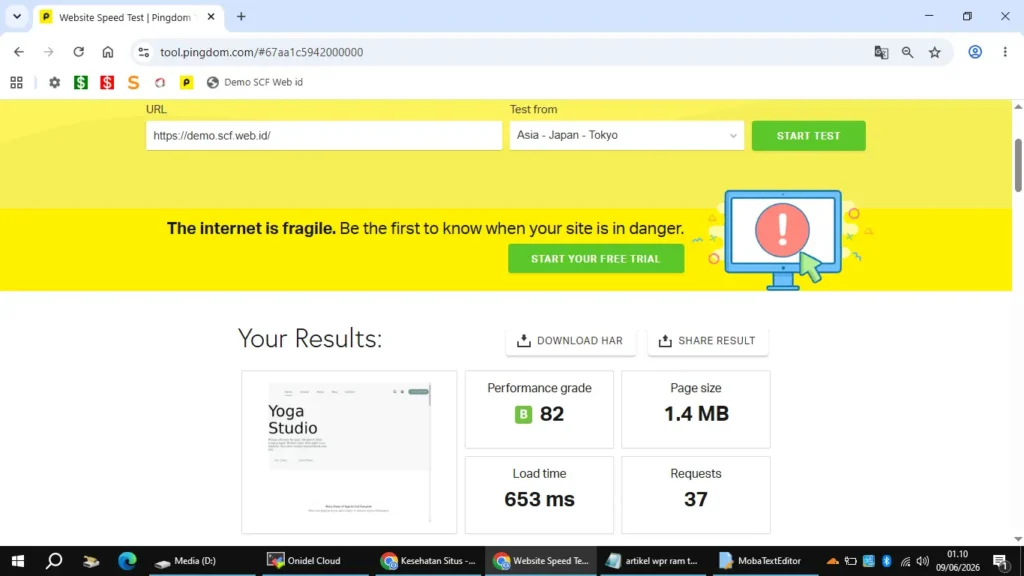
WordPress Test
- Demo SCF Web id
- Theme 2: Blocksy Starter Sites Yogi, Twenty Twenty-Five (Tidak Aktiv)
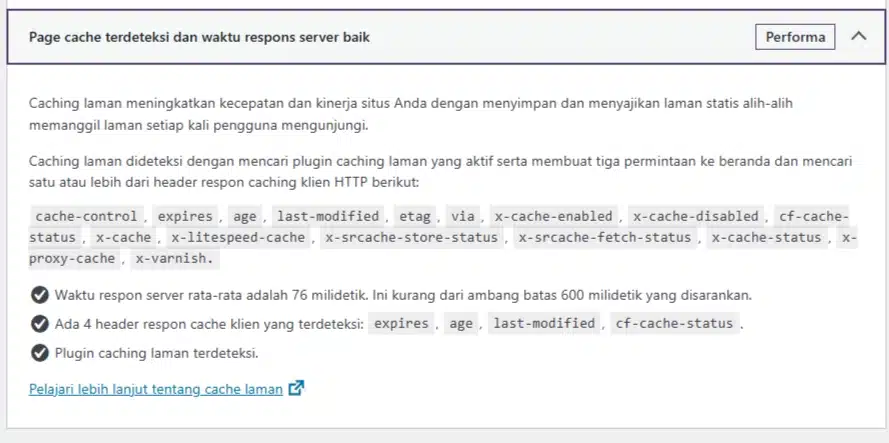
- Plugin 10: Akismet Anti-spam, Blocksy Companion, Cloudflare, MB Custom Post Types & Custom Taxonomies, Redis Object Cache, Stackable, WPForms Lite, WP Rocket, WP Rocket | Purge Cloudflare via Cache Lifespan, WP Rocket | Varnish IP
Paket Install
- CloudPanel v2.5.3 – [2025-12-04]
- Debian 13
- MariaDB 11.8
cloud-init status --wait
sudo timedatectl set-timezone Asia/Jakarta
apt update && apt upgrade && apt autoremove && apt autoclean && apt clean
systemctl list-unit-files --type=service --state=enabled
curl -sL yabs.sh | bash
Debian 13 Onidel Cloud
root@onidel12:~# systemctl list-unit-files --type=service --state=enabled
UNIT FILE                            STATE   PRESET
apparmor.service                     enabled enabled
cloud-config.service                 enabled enabled
cloud-final.service                  enabled enabled
cloud-init-local.service             enabled enabled
cloud-init-main.service              enabled enabled
cloud-init-network.service           enabled enabled
e2scrub_reap.service                 enabled enabled
[email protected]                       enabled enabled
grub-common.service                  enabled enabled
ssh.service                          enabled enabled
sshd-keygen.service                  enabled enabled
systemd-network-generator.service    enabled enabled
systemd-networkd-wait-online.service enabled enabled
systemd-networkd.service             enabled enabled
systemd-pstore.service               enabled enabled
systemd-resolved.service             enabled enabled
systemd-timesyncd.service            enabled enabled
unattended-upgrades.service          enabled enabled

18 unit files listed.
root@onidel12:~#
Install CloudPanel
Debian 13 & MariaDB 11.8
apt update && apt -y upgrade && apt -y install curl wget sudocurl -sS https://installer.cloudpanel.io/ce/v2/install.sh -o install.sh; \
echo "6eac061df80f08b75224fcd7fce2f115e201696d8a6122e31abf7259a813b462 install.sh" | \
sha256sum -c && sudo DB_ENGINE=MARIADB_11.8 bash install.shSGML Base Downgrading
root@milan26:~# apt upgrade
DOWNGRADING:
  sgml-base

Summary:
  Upgrading: 0, Installing: 0, Downgrading: 1, Removing: 0, Not Upgrading: 0
  Download size: 12.0 kB
  Space needed: 0 B / 43.8 GB available

Continue? [Y/n]
sudo nano /etc/apt/preferences.d/cloudpanel-pin
Package: sgml-base
Pin: release o=Debian
Pin-Priority: 1001
Package: *
Pin: origin d17k9fuiwb52nc.cloudfront.net
Pin-Priority: 500
sudo apt update && sudo apt upgradeCloudPanel Servis
root@onidel12:~# systemctl list-unit-files --type=service --state=enabled
UNIT FILE                            STATE   PRESET
apparmor.service                     enabled enabled
chrony.service                       enabled enabled
cloud-config.service                 enabled enabled
cloud-final.service                  enabled enabled
cloud-init-local.service             enabled enabled
cloud-init-main.service              enabled enabled
cloud-init-network.service           enabled enabled
clp-agent.service                    enabled enabled
clp-nginx.service                    enabled enabled
clp-php-fpm.service                  enabled enabled
cron.service                         enabled enabled
dphys-swapfile.service               enabled enabled
e2scrub_reap.service                 enabled enabled
fail2ban.service                     enabled enabled
[email protected]                       enabled enabled
grub-common.service                  enabled enabled
mariadb.service                      enabled enabled
memcached.service                    enabled enabled
nginx.service                        enabled enabled
php7.1-fpm.service                   enabled enabled
php7.2-fpm.service                   enabled enabled
php7.3-fpm.service                   enabled enabled
php7.4-fpm.service                   enabled enabled
php8.0-fpm.service                   enabled enabled
php8.1-fpm.service                   enabled enabled
php8.2-fpm.service                   enabled enabled
php8.3-fpm.service                   enabled enabled
php8.4-fpm.service                   enabled enabled
php8.5-fpm.service                   enabled enabled
postfix.service                      enabled enabled
proftpd.service                      enabled enabled
redis-server.service                 enabled enabled
ssh.service                          enabled enabled
sshd-keygen.service                  enabled enabled
systemd-network-generator.service    enabled enabled
systemd-networkd-wait-online.service enabled enabled
systemd-networkd.service             enabled enabled
systemd-pstore.service               enabled enabled
systemd-resolved.service             enabled enabled
ufw.service                          enabled enabled
unattended-upgrades.service          enabled enabled
varnish.service                      enabled enabled

42 unit files listed.
root@onidel12:~#

17 13 12
systemctl stop --now memcached php7.1-fpm php7.2-fpm php7.3-fpm php7.4-fpm php8.0-fpm php8.1-fpm php8.2-fpm php8.3-fpm php8.5-fpm postfix proftpd
systemctl disable --now memcached php7.1-fpm php7.2-fpm php7.3-fpm php7.4-fpm php8.0-fpm php8.1-fpm php8.2-fpm php8.3-fpm php8.5-fpm postfix proftpdroot@onidel12:~# systemctl list-unit-files --type=service --state=enabled
UNIT FILE STATE PRESET
apparmor.service enabled enabled
chrony.service enabled enabled
cloud-config.service enabled enabled
cloud-final.service enabled enabled
cloud-init-local.service enabled enabled
cloud-init-main.service enabled enabled
cloud-init-network.service enabled enabled
clp-agent.service enabled enabled
clp-nginx.service enabled enabled
clp-php-fpm.service enabled enabled
cron.service enabled enabled
dphys-swapfile.service enabled enabled
e2scrub_reap.service enabled enabled
fail2ban.service enabled enabled
[email protected] enabled enabled
grub-common.service enabled enabled
mariadb.service enabled enabled
nginx.service enabled enabled
php8.4-fpm.service enabled enabled
redis-server.service enabled enabled
ssh.service enabled enabled
sshd-keygen.service enabled enabled
systemd-network-generator.service enabled enabled
systemd-networkd-wait-online.service enabled enabled
systemd-networkd.service enabled enabled
systemd-pstore.service enabled enabled
systemd-resolved.service enabled enabled
ufw.service enabled enabled
unattended-upgrades.service enabled enabled
varnish.service enabled enabled
30 unit files listed.
root@onidel12:~#
17 13Host
root@onidel12:~# nano /etc/hosts

127.0.0.1       demo.www.scf.web.id

root@onidel12:~# cat /etc/hosts
127.0.0.1       localhost
::1             localhost ip6-localhost ip6-loopback
ff02::1         ip6-allnodes
ff02::2         ip6-allrouters
127.0.0.1       onidel12 onidel12.scf.my.id
127.0.0.1       demo.www.scf.web.id
root@onidel12:~#
CLP Rocket Static
Cara Pemasangan CLP Rocket Static
# Start CLP Rocket Static

set $wpr_cache_file "/wp-content/cache/wp-rocket/$host$request_uri/index-https.html";
set $scf_bypass 0;

if ($request_method = POST) { set $scf_bypass 1; }
if ($args) { set $scf_bypass 1; }

if ($http_cookie ~* "wordpress_[a-f0-9]+|wp-postpass|wordpress_no_cache|wordpress_logged_in|comment_author") {
    set $scf_bypass 1;
}

if ($scf_bypass = 1) {
    set $wpr_cache_file "/bypass-cache-scf";
}

add_header X3-Cache-Engine "CLP ROCKET STATIC";

location / {
    try_files $wpr_cache_file $uri $uri/ /index.php?$args;
}

# End CLP Rocket Static
WP Rocket Cache Tmpfs
rm -rf /home/scf-demo/htdocs/demo.www.scf.web.id/wp-content/cache/wp-rocket/*

sudo nano /etc/fstab
tmpfs /home/scf-demo/htdocs/demo.www.scf.web.id/wp-content/cache/wp-rocket/ tmpfs defaults,size=250M,uid=scf-demo,gid=scf-demo,mode=0755 0 0

sudo mount -a
systemctl daemon-reload
df -h
root@onidel12:~# df -h
Filesystem Size Used Avail Use% Mounted on
udev 966M 0 966M 0% /dev
tmpfs 198M 820K 197M 1% /run
/dev/vda1 20G 6.4G 13G 34% /
tmpfs 987M 0 987M 0% /dev/shm
tmpfs 5.0M 0 5.0M 0% /run/lock
tmpfs 987M 0 987M 0% /tmp
tmpfs 1.0M 0 1.0M 0% /run/credentials/systemd-journald.service
tmpfs 1.0M 0 1.0M 0% /run/credentials/systemd-resolved.service
/dev/vda15 124M 8.7M 116M 8% /boot/efi
tmpfs 1.0M 0 1.0M 0% /run/credentials/systemd-networkd.service
tmpfs 1.0M 0 1.0M 0% /run/credentials/[email protected]
tmpfs 1.0M 0 1.0M 0% /run/credentials/[email protected]
tmpfs 198M 4.0K 198M 1% /run/user/0
tmpfs 250M 0 250M 0% /home/scf-demo/htdocs/demo.www.scf.web.id/wp-content/cache/wp-rocket
root@onidel12:~#
CloudFlare Workers CLP Rocket Static
/**
 * Welcome to Cloudflare Workers! This is your first worker.
 *
 * - Run "npm run dev" in your terminal to start a development server
 * - Open a browser tab at http://localhost:8787/ to see your worker in action
 * - Run "npm run deploy" to publish your worker
 *
 * Learn more at https://developers.cloudflare.com/workers/
 */

export default {
  async fetch(request, env, ctx) {
    const url = new URL(request.url);
    const cookie = request.headers.get('Cookie') || "";

    // =====================================================================
    // 1. DAFTAR PENGECUALIAN (Bypass Cache - Langsung ke VPS Onidel)
    // =====================================================================

    // A. Bypass untuk Admin & Penulis
    const isLogin = cookie.includes("wordpress_logged_in_") || cookie.includes("wp-postpass_");
    const isAdmin = url.pathname.startsWith("/wp-admin") || url.pathname.startsWith("/wp-login.php");
    const isPreview = url.searchParams.has("preview");

    // B. Bypass untuk Komentar (Sangat Penting agar tidak nyangkut)
    // cookie "comment_author_" muncul agar komentator bisa melihat status "Komentar Menunggu Moderasi"
    const isCommenter = cookie.includes("comment_author_");
    const isWpCommentsPost = url.pathname.includes("wp-comments-post.php");

    // C. Bypass untuk Aktivitas Sistem (POST, Cronjob, API)
    const isPostMethod = request.method === "POST";
    const isCron = url.pathname.includes("wp-cron.php");
    const isXmlrpc = url.pathname.includes("xmlrpc.php");

    // EKSEKUSI BYPASS
    if (isLogin || isAdmin || isPreview || isCommenter || isWpCommentsPost || isPostMethod || isCron || isXmlrpc) {
      let adminResponse = await fetch(request);
      const adminHeaders = new Headers(adminResponse.headers);

      // Mencegah browser/CDN menyimpan data dinamis (Admin/Komentator)
      adminHeaders.set("Cache-Control", "no-cache, no-store, must-revalidate");
      adminHeaders.set("A1-Cache-Engine", "WORKERS CLP ROCKET STATIC");
      adminHeaders.set("A1-Cache-Status", "WORKERS DYNAMIC");

      return new Response(adminResponse.body, {
        status: adminResponse.status,
        statusText: adminResponse.statusText,
        headers: adminHeaders
      });
    }

    // =====================================================================
    // 2. JIKA TAMU ANONIM (Aktifkan Edge Cache Cloudflare)
    // =====================================================================
    const newRequest = new Request(request, {
      cf: {
        cacheEverything: true,
        cacheTtlByStatus: {
          "200-299": 604800, // Simpan halaman sukses selama 7 hari (Edge)
          "404": 300,        // Simpan halaman 404 selama 5 menit
          "500-599": 0       // Jangan pernah simpan halaman Error Server!
        }
      },
    });

    let response = await fetch(newRequest);

    // =====================================================================
    // 3. MODIFIKASI HEADER UNTUK TAMU (Browser Cache & Branding)
    // =====================================================================
    const newHeaders = new Headers(response.headers);

    // Memaksa browser selalu minta update ke Cloudflare (Biar pas Mas update artikel, pembaca langsung dapat yang baru)
    newHeaders.set("Cache-Control", "public, max-age=0, must-revalidate");

    // Stempel Branding Arsitek
    newHeaders.set("A1-Cache-Engine", "WORKERS CLP ROCKET STATIC");
    newHeaders.set("A1-Cache-Status", response.headers.get("cf-cache-status") === "HIT" ? "WORKERS HIT" : "WORKERS MISS");

    return new Response(response.body, {
      status: response.status,
      statusText: response.statusText,
      headers: newHeaders
    });
  },
};
Custom Test
Catatan konfigurasi sementara untuk keperluan test.
Varnish
Penambahan debug header di Default VCL /etc/varnish/default.vcl
set resp.http.X-2-Cache-Engine = "SCF CLOUDPANEL";vcl 4.0;
import std;
backend default {
.host = "127.0.0.1";
.port = "8080";
.first_byte_timeout = 600s;
}
acl purger {
"localhost";
"127.0.0.1";
"172.17.0.1";
}
sub vcl_recv {
if (req.restarts > 0) {
set req.hash_always_miss = true;
}
#return (pass);
if (req.method == "PURGE") {
if (client.ip !~ purger) {
return (synth(405, "Method not allowed"));
}
if (req.http.X-Cache-Tags) {
ban("obj.http.X-Cache-Tags ~ " + req.http.X-Cache-Tags);
} else {
ban("req.http.host == " +req.http.host+" && req.url ~ "+req.url);
return (synth(200, "Purged"));
}
return (synth(200, "Purged"));
}
if (req.method != "GET" &&
req.method != "HEAD" &&
req.method != "PUT" &&
req.method != "POST" &&
req.method != "TRACE" &&
req.method != "OPTIONS" &&
req.method != "DELETE") {
/* Non-RFC2616 or CONNECT which is weird. */
return (pipe);
}
# We only deal with GET and HEAD by default
if (req.method != "GET" && req.method != "HEAD") {
return (pass);
}
# Set initial grace period usage status
set req.http.grace = "none";
# normalize url in case of leading HTTP scheme and domain
set req.url = regsub(req.url, "^http[s]?://", "");
# collect all cookies
std.collect(req.http.Cookie);
if (req.url ~ "^/admin/" || req.url ~ "/paypal/") {
return (pass);
}
if (req.http.cookie ~ "wordpress_logged_in_") {
return (pass);
}
if (req.http.Accept-Encoding) {
if (req.url ~ "\.(jpg|jpeg|png|gif|gz|tgz|bz2|tbz|mp3|ogg|swf|flv)$") {
# No point in compressing these
unset req.http.Accept-Encoding;
} elsif (req.http.Accept-Encoding ~ "gzip") {
set req.http.Accept-Encoding = "gzip";
} elsif (req.http.Accept-Encoding ~ "deflate" && req.http.user-agent !~ "MSIE") {
set req.http.Accept-Encoding = "deflate";
} else {
# unknown algorithm
unset req.http.Accept-Encoding;
}
}
if (req.url ~ "(\?|&)(gclid|cx|ie|cof|siteurl|zanpid|origin|fbclid|mc_[a-z]+|utm_[a-z]+|_bta_[a-z]+)=") {
set req.url = regsuball(req.url, "(gclid|cx|ie|cof|siteurl|zanpid|origin|fbclid|mc_[a-z]+|utm_[a-z]+|_bta_[a-z]+)=[-_A-z0-9+()%.]+&?", "");
set req.url = regsub(req.url, "[?|&]+$", "");
}
if (req.http.Authorization ~ "^Bearer") {
return (pass);
}
return (hash);
}
sub vcl_hash {
if (req.http.host) {
hash_data(req.http.host);
} else {
hash_data(server.ip);
}
}
sub vcl_backend_response {
set beresp.grace = 3d;
if (beresp.http.content-type ~ "text") {
set beresp.do_esi = true;
}
if (beresp.http.content-type ~ "text") {
set beresp.do_gzip = true;
}
# cache only successfully responses and 404s that are not marked as private
if (beresp.status != 200 && beresp.status != 404 && beresp.http.Cache-Control ~ "private") {
set beresp.uncacheable = true;
set beresp.ttl = 86400s;
return (deliver);
}
# validate if we need to cache it and prevent from setting cookie
if (beresp.ttl > 0s && (bereq.method == "GET" || bereq.method == "HEAD")) {
unset beresp.http.set-cookie;
}
if (!beresp.http.cache-control) {
set beresp.ttl = 0s;
set beresp.uncacheable = true;
}
return (deliver);
}
sub vcl_deliver {
set resp.http.X-2-Cache-Engine = "SCF CLOUDPANEL";
set resp.http.X-Cache-Age = resp.http.Age;
unset resp.http.Age;
# Avoid being cached by the browser.
if (resp.http.Cache-Control !~ "private") {
set resp.http.Pragma = "no-cache";
set resp.http.Expires = "-1";
set resp.http.Cache-Control = "no-store, no-cache, must-revalidate, max-age=0";
}
unset resp.http.X-Powered-By;
unset resp.http.Server;
unset resp.http.X-Varnish;
unset resp.http.Via;
unset resp.http.Link;
unset resp.http.X-Frame-Options;
unset resp.http.X-Content-Type-Options;
unset resp.http.X-Xss-Protection;
unset resp.http.Referer-Policy;
unset resp.http.X-Permitted-cross-domain-policies;
}
sub vcl_hit {
if (obj.ttl >= 0s) {
return (deliver);
}
set req.http.grace = "unlimited (unhealthy server)";
return (deliver);
}nano /lib/systemd/system/varnish.serviceroot@onidel12:~# cat /lib/systemd/system/varnish.service
[Unit]
Description=Varnish Cache, a high-performance HTTP accelerator
After=network-online.target nss-lookup.target
[Service]
Type=forking
KillMode=mixed
Restart=always
RestartSec=3
# Maximum number of open files (for ulimit -n)
LimitNOFILE=131072
# Shared memory (VSM) segments are tentatively locked in memory. The
# default value for vsl_space (or shorthand varnishd -l option) is 80MB.
# There are other types of segments that would benefit from allowing
# more memory to be locked.
LimitMEMLOCK=100M
# Enable this to avoid "fork failed" on reload.
TasksMax=infinity
# Maximum size of the corefile.
LimitCORE=infinity
# A PID file makes the main process selection deterministic.
RuntimeDirectory=%N
PIDFile=%t/%N/varnishd.pid
ExecStart=/usr/sbin/varnishd \
-a :6081 \
-f /etc/varnish/default.vcl \
-P %t/%N/varnishd.pid \
-p feature=+http2 \
-p http_resp_hdr_len=40000 \
-p thread_pool_min=100 \
-p thread_pool_max=5000 \
-p thread_pools=4 \
-s malloc,512m
ExecReload=/usr/sbin/varnishreload
[Install]
WantedBy=multi-user.target
root@onidel12:~#systemctl daemon-reloadNginx
Edit konfigurasi /etc/nginx/nginx.conf
user root;
# Sesuaikan dengan jumlah core CPU (AMD EPYC Mas ini 32-core, tapi karena ini VM, 'auto' sudah cukup)
worker_processes auto;
pid /run/nginx.pid;

# NAIKKAN BATAS FILE DESCRIPTOR (Maximal)
# worker_rlimit_nofile 8192;
worker_rlimit_nofile 100000;

include /etc/nginx/modules-enabled/*.conf;

events {
    # 20.000 koneksi serentak bukan masalah buat EPYC
    # worker_connections 2000;
    # multi_accept on;
    worker_connections 20000;
    multi_accept on;
    use epoll;
}

http {

    ##
    # Basic Settings
    ##

    geoip_country /etc/nginx/geoip/GeoIP.dat; # the country IP database
    geoip_city    /etc/nginx/geoip/GeoLiteCity.dat; # the city IP database

    real_ip_recursive on;

    set_real_ip_from 127.0.0.1;
    set_real_ip_from 10.0.0.0/8;
    set_real_ip_from 172.16.0.0/12;
    set_real_ip_from 192.168.0.0/16;
    set_real_ip_from 0.0.0.0/0;
    #real_ip_header X-Forwarded-For;

    log_format main '$remote_addr - $remote_user [$time_local] "$request" '
                    '$status $body_bytes_sent "$http_referer" '
                    '"$http_user_agent" "$http_x_forwarded_for"';

    log_format cloudflare '$http_cf_connecting_ip - $remote_user [$time_local] "$request" '
                          '$status $body_bytes_sent "$http_referer" '
                          '"$http_user_agent" "$http_x_forwarded_for"';

    sendfile on;
    tcp_nopush on;
    tcp_nodelay on;

    # NAIKKAN BUFFER UNTUK MENGHINDARI DISK I/O SAAT TRAFIK TINGGI
    # client_body_buffer_size  1K;
    # client_header_buffer_size 1k;
    client_body_buffer_size 128k;
    client_header_buffer_size 4k;
    large_client_header_buffers 4 32k;

    client_max_body_size 64M;

    # NAIKKAN KEEPALIVE UNTUK CONNECTION POOLING (PENTING!)
    # keepalive_timeout 65;
    keepalive_timeout 30;
    keepalive_requests 50000; # Biarkan koneksi terbuka lebih lama

    # types_hash_max_size 2048;
    types_hash_max_size 4096; # Perbesar buat banyak domain

    server_names_hash_bucket_size 128;
    server_tokens off;
    port_in_redirect off;
    access_log off;
    disable_symlinks if_not_owner from=/home/;

    map $scheme $fastcgi_https { ## Detect when HTTPS is used
      default off;
      https on;
    }

    include /etc/nginx/blocked_ips;

    pagespeed off;
    pagespeed XHeaderValue 1;

    ##
    # SSL Settings
    ##

    ssl_protocols TLSv1.2 TLSv1.3;
    ssl_session_cache builtin:1000 shared:SSL:10m;
    ssl_session_timeout 10m;
    ssl_ciphers EECDH+AESGCM:EDH+AESGCM;
    ssl_prefer_server_ciphers on;
    ssl_conf_command Options KTLS;
    # ssl_stapling on;
    # ssl_stapling_verify on;
    ssl_dhparam /etc/nginx/ssl/dhparams.pem;

    include /etc/nginx/mime.types;
    default_type application/octet-stream;

    ##
    # Logging Settings
    ##

    access_log /var/log/nginx/access.log;
    error_log /var/log/nginx/error.log;

    ##
    # Limit the requests for php
    ##

    limit_req_zone $binary_remote_addr zone=limit:10m rate=1r/s;

    ##
    # Gzip Settings
    ##

    gzip on;
    gzip_disable "msie6";
    gzip_vary on;
    gzip_proxied any;
    # gzip_comp_level 8;
    gzip_buffers 16 8k;
    gzip_http_version 1.1;
    # gzip_types text/plain text/css application/json application/x-javascript text/xml application/xml application/xml+rss text/javascript image/png image/gif image/jpeg application/javascript image/svg+xml;

    # GZIP & BROTLI (Dioptimasi untuk CPU Kencang)
    gzip_comp_level 6;
    gzip_min_length 1000; # Jangan kompres file terlalu kecil, buang-buang CPU
    gzip_types text/plain text/css application/json application/javascript text/xml application/xml application/xml+rss text/javascript image/svg+xml;

    ##
    # Brotli Settings
    ##

    brotli on;
    # brotli_comp_level 8;
    brotli_static on;
    # brotli_types text/plain text/css application/json application/x-javascript text/xml application/xml application/xml+rss text/javascript image/png image/gif image/jpeg application/javascript image/svg+xml;

    brotli_comp_level 6;
    brotli_types text/plain text/css application/json application/javascript text/xml application/xml application/xml+rss text/javascript image/svg+xml;

    ##
    # Virtual Host Configs
    ##

    include /etc/nginx/sites-enabled/*.conf;
}
Edit konfigurasi /etc/nginx/sites-enabled/custom-domain.conf hapus http2; dan tambahkan http2 on;
server {
  listen 80;
  listen [::]:80;
  # listen 443 ssl http2;
  # listen [::]:443 ssl http2;
  listen 443 ssl;
  listen [::]:443 ssl;
  http2 on;
  ssl_certificate_key /etc/nginx/ssl-certificates/custom-domain.key;
  ssl_certificate /etc/nginx/ssl-certificates/custom-domain.crt;
  server_name onidel12.scf.my.id;
  client_max_body_size 5048M;
  root /home/clp/htdocs/app/files/public;

  #access_log /home/clp/logs/nginx/access.log;
  error_log /home/clp/logs/nginx/error.log;

  if ($scheme != "https") {
    rewrite ^ https://$host$uri permanent;
  }

  add_header Cache-Control no-transform;
  pagespeed off;

  location / {
    proxy_set_header Host $http_host;
    proxy_set_header X-Real-IP $remote_addr;
    proxy_set_header X-Forwarded-For $remote_addr;
    proxy_set_header X-Forwarded-Host $http_host;
    proxy_pass https://127.0.0.1:8443/;
    proxy_max_temp_file_size 0;
    proxy_connect_timeout 7200;
    proxy_send_timeout 7200;
    proxy_read_timeout 7200;
    proxy_buffer_size 128k;
    proxy_buffers 4 256k;
    proxy_busy_buffers_size 256k;
    proxy_temp_file_write_size 256k;
 }
}
PHP
Edit /etc/php/8.4/fpm/php.ini tambahkan kode di bawah ini dan letakkan di paling bawah sendiri
opcache.interned_strings_buffer=64Edit konfigurasi /etc/php/8.4/fpm/pool.d/demo.www.scf.web.id.conf
[demo.www.scf.web.id]
listen = 127.0.0.1:19001
user = scf-demo
group = scf-demo
listen.allowed_clients = 127.0.0.1

;pm = ondemand
;pm.max_children = 250

;pm.process_idle_timeout = 10s
;pm.max_requests = 100

;listen.backlog = 65535
;pm.status_path = /status
;request_terminate_timeout = 7200s
;rlimit_files = 131072
;rlimit_core = unlimited
;catch_workers_output = yes


; Gunakan dynamic biar aman, tapi dengan start yang lebih agresif
pm = dynamic
pm.max_children = 60
pm.start_servers = 20
pm.min_spare_servers = 10
pm.max_spare_servers = 30

pm.process_idle_timeout = 10s
pm.max_requests = 1000

listen.backlog = 65535
pm.status_path = /status
request_terminate_timeout = 7200s
rlimit_files = 131072
rlimit_core = unlimited
catch_workers_output = yes
Bypass IP loader.io
CloudFlare > Security rules > Custom rules > New custom rule > Rule name > Edit expression > Skip > Cheklist all rules > Save
(ip.src in {100.48.73.17 100.52.178.12 100.53.152.42 107.21.10.110 13.219.224.146 13.221.217.86 34.200.238.180 34.230.84.92 3.81.54.66 3.85.245.52 3.87.128.47 44.199.215.50 44.200.184.207 54.174.138.147 98.81.115.11 98.81.58.95 98.89.43.174})Test Lanjutan
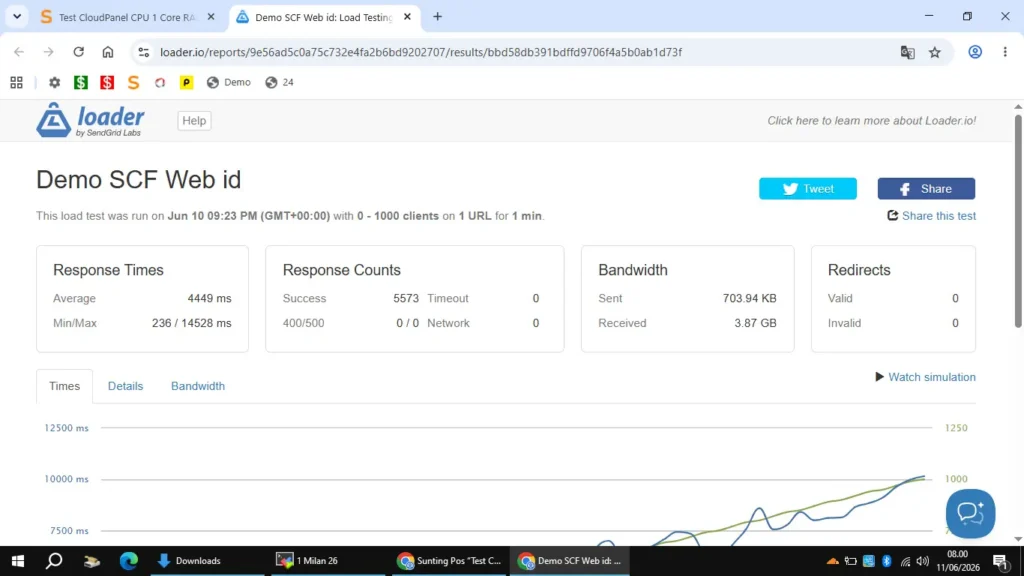
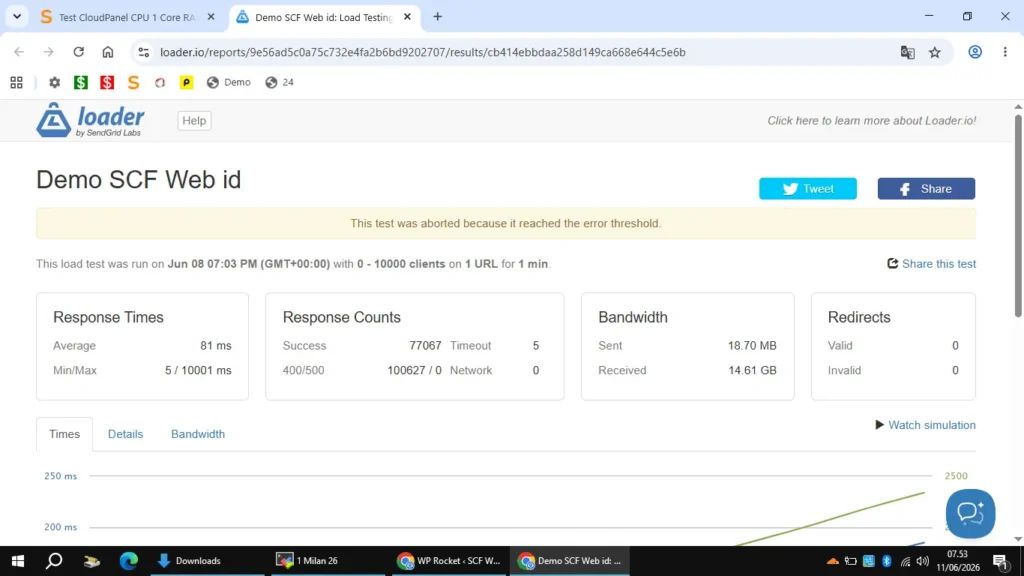
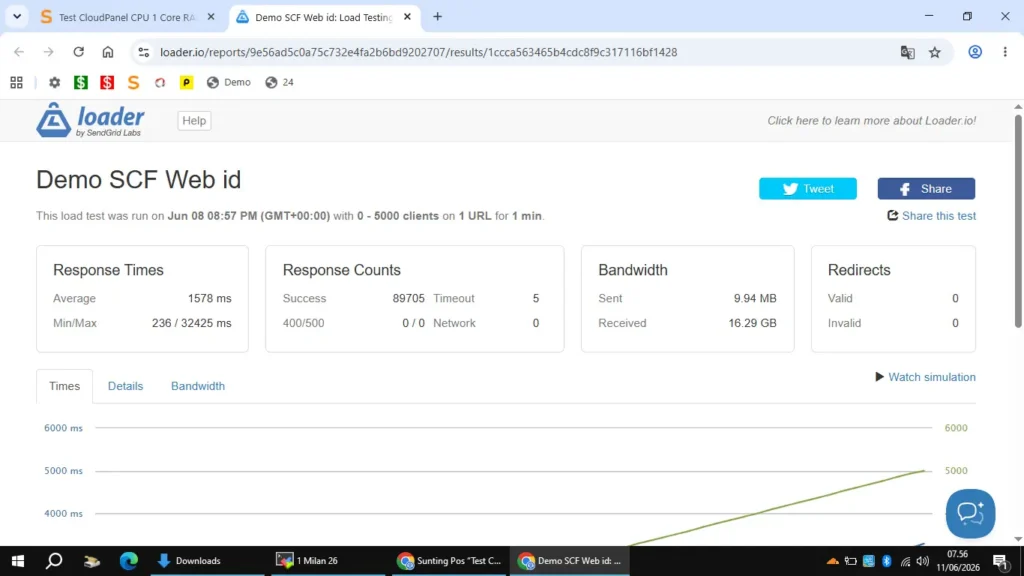
Gambaran Simulasi Request
- 1 menit > 1.000 page views
- 1 hari > 1.000 x 60 menit x 24 jam = 1.444.000 page views
- 1 bulan > 1.444.000 x 30 hari = 43.200.000 page views
Selama memakai WordPress sejak 2013 page views per bulan tertinggi saya sekitar 900.000 page views untuk Jalak Suren Net sekitar tahun 2017. Target saya untuk spek VPS dengan CPU 1 Core, RAM 2 GB dan memakai CloudPanel adalah 600.000 s/d 2.000.000 PV perbulan. Jadi untuk saat ini saya rasa sudah cukup dulu untuk testnya, simulasi test sudah melebihi target gambaran saya. Next test kapan-kapan Test Workers CLP Rocket Static pakai Workers berbayar.